









Immersive Mapper PRO v7.2.1
Map, warp, and blend content onto any projection surface
The ultimate projection mapping software packages for DirectX, OpenGL, Vulkan, Windows 7, 8, 10 and 11 Desktop. Map your desktop directly to any physical object while leaving content creation to the professionals
Up to 16
Projectors per PC
16x
Grids per projector
GPU
Hardware Accelerated
1. Design
2. Align
3. Map
The problem
Complex mapping shouldn't require complex content creation
If you're mapping digital signage, retail advertising, or multi-content presentations, you need a tool that separates the content from the complex physical geometry
How do I map multiple distinct videos or images to different facets of a physical object?
How can I seamlessly warp standard Windows applications or DirectX/OpenGL games?
What if I need to mask out specific parts of the projection to fit an irregular surface?
How can I manage geometric mapping for a massive 16-projector setup?
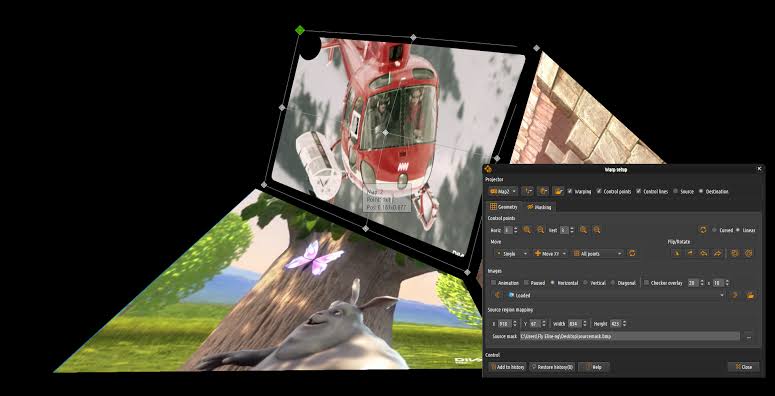
Immersive Mapper PRO solves this by mapping your standard desktop output. It lets you put your content (video or images) anywhere on the desktop, and maps it independently to the projection surfaces using precise geometric correction.
Key features
Everything you need for professional projection mapping
From seamless desktop integration to highly detailed geometric correction grids and interactive masking
16x16
Massive multi-projector support
Immersive Mapper PRO supports up to 16 projectors per PC, which can be configured in different horizontal and vertical stacking. Per projector, up to 16 independent mapping grids are supported to map to any kind of projection surface.
Complete API support
Full projection mapping support for DirectX, OpenGL, Vulkan, and Windows Desktop applications.
Source & Destination
Easily switch between Image area selection (source mapping) and Geometrical correction (destination mapping) modes.
Interactive Masking
Mask parts of the image using an interactive masking grid per projector or a black & white masking bitmap per display.
Grid Editing
Adjust up to 50 horizontal and vertical control points using your mouse or fine-grained keyboard shortcuts.
Multiple Config Sets
Configure up to 8 independent configuration sets and switch between them instantaneously with hotkeys for different scenes.
Advanced Sampling
Uses advanced bi-cubic sampling and anti-aliasing techniques to smooth and improve image quality for highly stretched displays.
Mapping tools
Precision adjustments for perfect alignment
Fine-tune every aspect of your projection surface, from texture offsets to checker overlays
Desktop Warping
Bi-cubic sampling
Anti-aliasing
Image mirroring & flipping
Checker grid overlay
Advanced warp cursor
Map your content anywhere
Join the professionals who trust Immersive Mapper PRO to decouple content creation from complex projection geometry
Mapper PRO Licenses
New licenses
PC-locked or USB dongle. Pick the license optiion that matches your setup requirements
Every license includes 2-years updates and support
.
Basic
€120
PC Locked
Home user only
€190
USB Dongle
Max 1 projector
16 surfaces
Compare
Most popular
Advanced
€180
PC Locked
Home user only
€250
USB Dongle
Up to 16 projectors
16 x 16 surfaces
Compare
Mapper PRO extended Licenses
Extended licenses
Extended a license with an additional 2-years updates and support.
.
Basic
€48
PC Locked
Home user only
€76
USB Dongle
Most popular
Advanced
€72
PC Locked
Home user only
€100
USB Dongle
Mapper PRO
License features
Pick the license option that matches your projection scope.
Basic
Advanced
Max projectors
1
16
Max surfaces
16
256
Surface masking
Downloads
Immersive Mapper PRO v7.2.1 - Latest version