









Immersive SDK PRO
Low-level C/C++ integration of warping & edge-blending
Source code level integration into any DirectX or OpenGL graphics engine or custom Image Generator (IG). Embed professional post-processing warping and blending directly into your rendering pipeline with zero wrapper overhead.
C/C++
Headers & DLLs
DX & OGL
DirectX 9/11/12 & OpenGL
.procalib
Native Loader
1. Design
2. Align
3. Integrate
The challenge
Engineered for developers who need maximum performance
Standard desktop-hook wrappers or external display drivers don't always fit specialized Image Generators, proprietary flight simulators, or strict real-time graphics pipelines
Need low-level warping and edge-blending embedded natively inside your proprietary graphics engine or simulator?
Want zero-latency post-processing without relying on external desktop hooks, display driver wrappers, or virtual desktop overlays?
Looking to build a commercial Image Generator (IG) system with built-in camera-based multi-projector auto-calibration?
Require direct loading of .procalib calibration files produced by Immersive Calibration PRO inside C/C++ rendering loops?
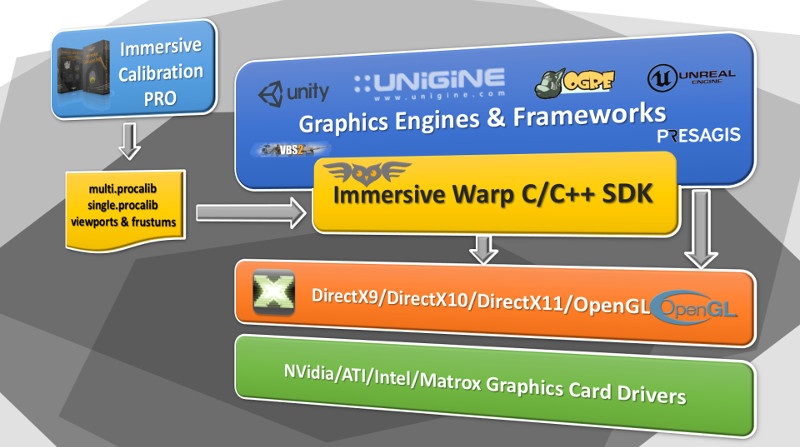
Immersive SDK PRO provides the exact low-level solution. Designed as a lightweight set of C/C++ headers and DLL libraries, it hooks directly into your DirectX or OpenGL rendering calls. You gain full control over framebuffers, multi-channel post-processing, and multi-projector warping with non-measurable GPU latency.
Key features
Everything needed for native rendering integration
Complete C/C++ API toolset, multi-API DirectX/OpenGL hooks, and seamless calibration file support
C/C++
Source code level pipeline integration
Embed multi-projector warping and edge-blending directly into your graphics pipeline code. Standardized C/C++ header files, dynamic link libraries (.dll), and static link libraries (.lib) give you direct control over initialization, frame rendering, and teardown.
DirectX & OpenGL support
Universal support for DirectX 9, DirectX 11, DirectX 12, and OpenGL graphics pipelines. Works seamlessly across windowed, full-screen, and multi-viewport rendering engines.
Native .procalib loader
Directly load exported `.procalib` alignment files generated by Immersive Calibration PRO (Free or Standalone licenses). No manual mesh or blend texture recalculation required.
Custom image generator (IG) building
Empowers flight simulator developers, military training solution providers, and planetarium engineers to build custom IG software with native multi-projector warping built-in.
Comprehensive API & HTML docs
Includes complete C/C++ header documentation, clear method signatures, step-by-step HTML API reference guides, and copy-pasteable sample code projects for visual studio.
Zero-Latency GPU post-processing
Hooks directly into rendering framebuffers using native GPU shaders. High-precision 16-bit HDR color processing, anisotropic filtering, and zero-frame-delay execution.
Multi-channel & Multi-GPU support
Seamlessly manages multiple display channels across single or multi-GPU configurations, binding distinct warp meshes and blending profiles per output channel.
Integration workflow
Simple 3-step implementation pipeline
Add professional multi-projector alignment into your graphics software in hours, not months
01
Calibrate & Export .procalib
Use Immersive Calibration PRO (Free or Standalone) to perform automated camera-based screen calibration and export the alignment data as a `.procalib` file.
02
Include Headers & Link DLL
Add `ImmersiveSDK.h` to your visual C/C++ project, include the static library in your build configuration, and ship the lightweight DLL alongside your application binary.
03
Hook Graphics Render Loop
Initialize the SDK instance, pass your DirectX/OpenGL device handle, load the `.procalib` file, and call `ApplyWarpAndBlend()` inside your main render loop right before buffer swap.
DirectX 9 / 11 / 12
OpenGL 3.x+ / Core
C / C++ Native API
.procalib Native Parser
16-bit HDR Blending
Anisotropic Filtering
Multi-Channel GPU Sync
Sample Code Included
Integrate Immersive SDK PRO into your software
Contact our senior engineering team to request an SDK trial kit, C/C++ sample code, and tailored licensing options for your graphics project